Restaurant Ops Suite
Menu engineering, food-safety logs, and review requests — the back office of a food business, self-hosted.
3 apps, $149 once: $267 if bought separately, so you keep $118.
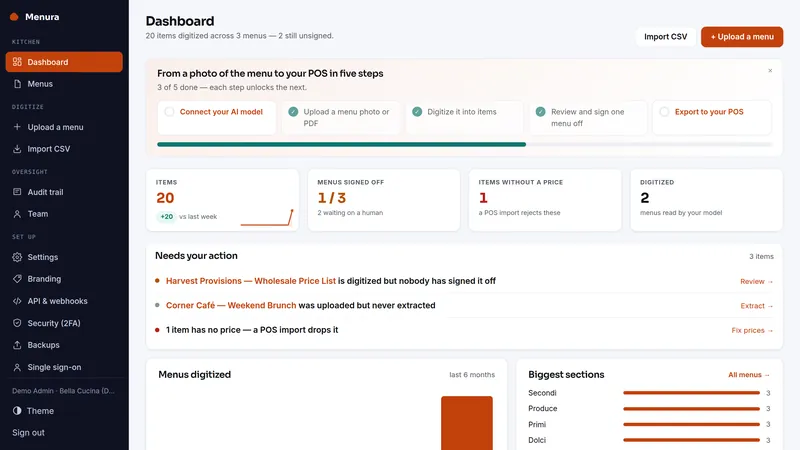
 Menura
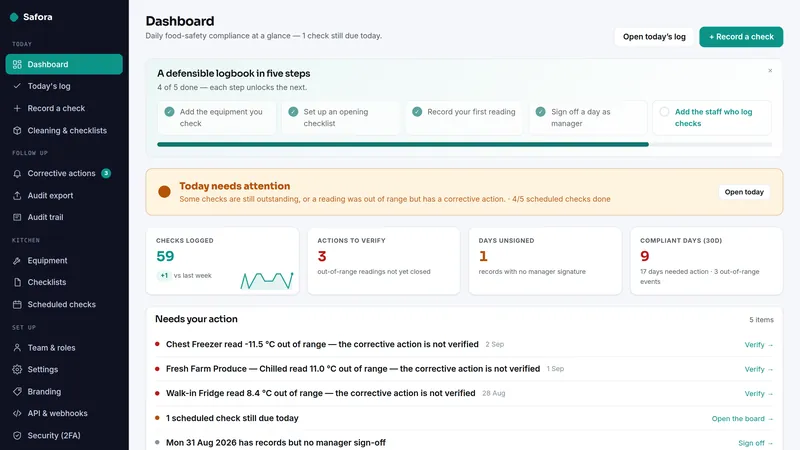
 Safora
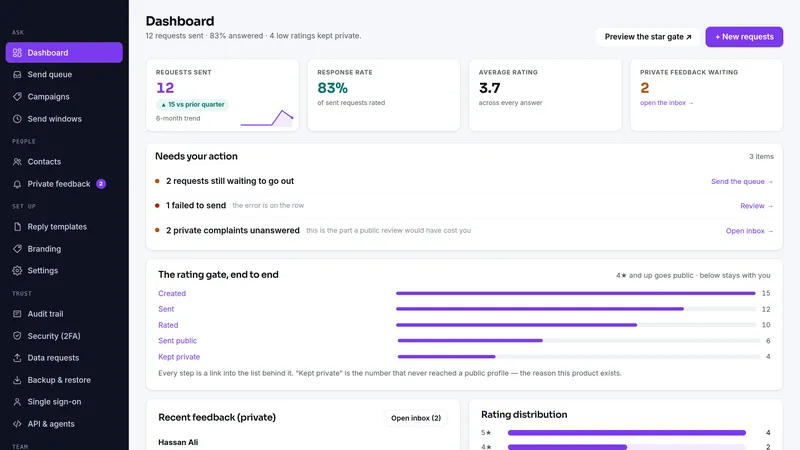
 Revup
RevupWhat's inside · 3 full apps
What the same jobs cost rented, year one
The suite is $149 once. The figures above are the vendors' published monthly prices multiplied by twelve, nothing else.
Why this suite
A food business runs on three quiet systems: knowing which menu items actually make money, keeping the food-safety diary inspectors ask for, and turning happy tables into public reviews.
- Three separate tools, three subscriptions, three logins
- One suite: menu margins, HACCP logs, and review automation on your own server
- Each product installs standalone — adopt them one at a time
Before you buy
Plain PHP 8.1+ (tested on PHP 8.3) with MySQL, MariaDB or SQLite, on ordinary shared hosting or the smallest VPS. Each app has its own two-minute web installer and its own database.
Every app above has a live demo on sample data, with no sign-up. The demos run the same builds you download.
The full PHP source of every app. Your data stays on your server, with CSV export and one-click backups in each app, and nothing connects back to us.
What each app deliberately doesn't do
Each app's own limits apply unchanged when it arrives as part of the suite.
Menura
- No POS API integration — Menura writes files (POS CSV / nested CSV / JSON, columns documented in the README and pinned by tests) and you import them. No till vendor's API is spoken, no credentials held.
- PDF extraction works best with text-layer PDFs; a scanned or photographed menu is the model's job, and models vary.
- One restaurant per installation (single-tenant); your staff share it with viewer, member and admin roles.
- The QR menu shows the menu; it does not take orders or payments.
- No OCR built in; the vision model you configure does the reading.
- Extraction accuracy is not guaranteed for any given menu layout or language — which is why the review screen and the POS import preview exist.
Safora
- Single-tenant: one business per installation (staff share the one instance, with roles).
- Safora documents your records; it does not connect out to fridge probes or IoT sensors. A probe that can make an HTTP request can post readings to the REST API: an out-of-range one is stored as an open breach, red until a person records the corrective action.
- It does not submit anything to any authority; it produces records you keep and present.
- Not legal advice, and not a certificate of compliance. The thresholds are HACCP-aligned defaults you can change; the bank-holiday list is England & Wales — one-off royal holidays, Scotland and Northern Ireland differ.
- Email goes through your own SMTP server; the open-breach chase is off until you switch it on.
Revup
- Single-tenant: one business per installation (staff get their own accounts, roles and 2FA).
- Email is plain-text by design — a plain message from your own SMTP lands where a templated HTML one often does not.
- Scheduling is a send window plus one follow-up, not a branching drip campaign — a second ask reads as pestering, which costs more reviews than it wins.
- The unattended schedule needs a cron entry you install yourself (one line, printed in the app, which also shows when the runner last ran).
- Twilio is the only built-in SMS provider; manual mode works with any channel you already use.
- No direct Google/Yelp API integration — the rating page links to your public review URL, and every customer who rates is shown it.
- Revup does not read or answer reviews posted on Google or other platforms, and posts nothing to social media itself.
- A Vendra sale cannot start an ask on its own yet: Vendra's sale webhook carries no customer contact.
Suite questions
What exactly do I receive?
Are these the same apps sold one by one?
Do the apps share one install or database?
I already own one of these apps. Do I pay for it again?
Can I start with one app and add the rest later?
What happens on a refund?
Which license do I need?
It comes down to how many installations you need. Running your own business on one site is the Single license. Running it on more than one site you own or operate is the Extended license, with no cap. Both cover every app in the suite.
- Install it on one domain or subdomain you own or operate
- Change the source however you like for that installation
- Run your own business on it commercially, client work included
- Re-download the current build any time from your buyer portal
- A second site, or an installation you hand to a client as theirs, needs the Extended license
- No reselling, redistributing or sublicensing the source
- Not for offering it to other people as a hosted service
- Everything the Single license grants
- Install it on as many domains as you own or operate — no cap on the number
- Up to ten client installations, one per client project, handed over or hosted for each client; for more, buy another Extended license
- White-label: remove or replace the product name and logo in the screens of client installations
- Still no reselling or redistributing the source itself
- Running it as a multi-tenant service others sign up for needs a SaaS agreement
Every download carries the full terms as LICENSE.txt. The complete wording is on the terms page.