Ownware OS + Own Your AI
Own the company's software — and the local-AI software you run beside it. Every Ownware app, the control plane, and OYA, one payment, your server.
49 apps, $1,499 once: $4,156 if bought separately, so you keep $2,657.
What's inside · 49 full apps
 Own Your AI (OYA)$249
 SaaS Kit$79
 Invora$99
 Slotly$99
 Vendra$59
 Gymora$69
 Rentara$119
 Consigna$84
 Approva$99
 Cashora$59
 Commissa$69
 Privara$79
 Confida$119
 Complia$79
 Packora$79
 Safora$79
 Waiverly$79
 Secreta$79
 Certora$79
 Extracta$89
 Expensa$89
 Specta$99
 Cargora$69
 Ledgira$59
 Menura$89
 Fixora$129
 Lendra$59
 Restock$89
 Revup$99
 Permora$89
 Supplia$69
 Leavora$99
 Assetora$59
 Rostera$69
 Clockora$69
 Votera$59
 Tokora$69
 Deliora$99
 Jobora$129
 Warrantora$79
 Loyalora$59
 Fleetora$69
 Cyresora$79
 Visitora$79
 Trainora$79
 Inspectora$79
 Onboardora$69
 Membora$59
 Helpora$69
Why this suite
Two things a business rents today that it could run itself: its software and its AI. Ownware OS is the first — every app in this catalog plus the control plane, bought once. Own Your AI is the second — local-AI software you run on a model you choose; it counts every outside connection, and you connect it to every one of those apps through their /mcp. Together they are the whole argument in one purchase: the shelf, and the software you run beside it, neither of them billed per seat, neither of them able to change terms on you.
Bought separately, the OS and Own Your AI each carry their own single price; the suite page shows today's figures side by side, computed live.
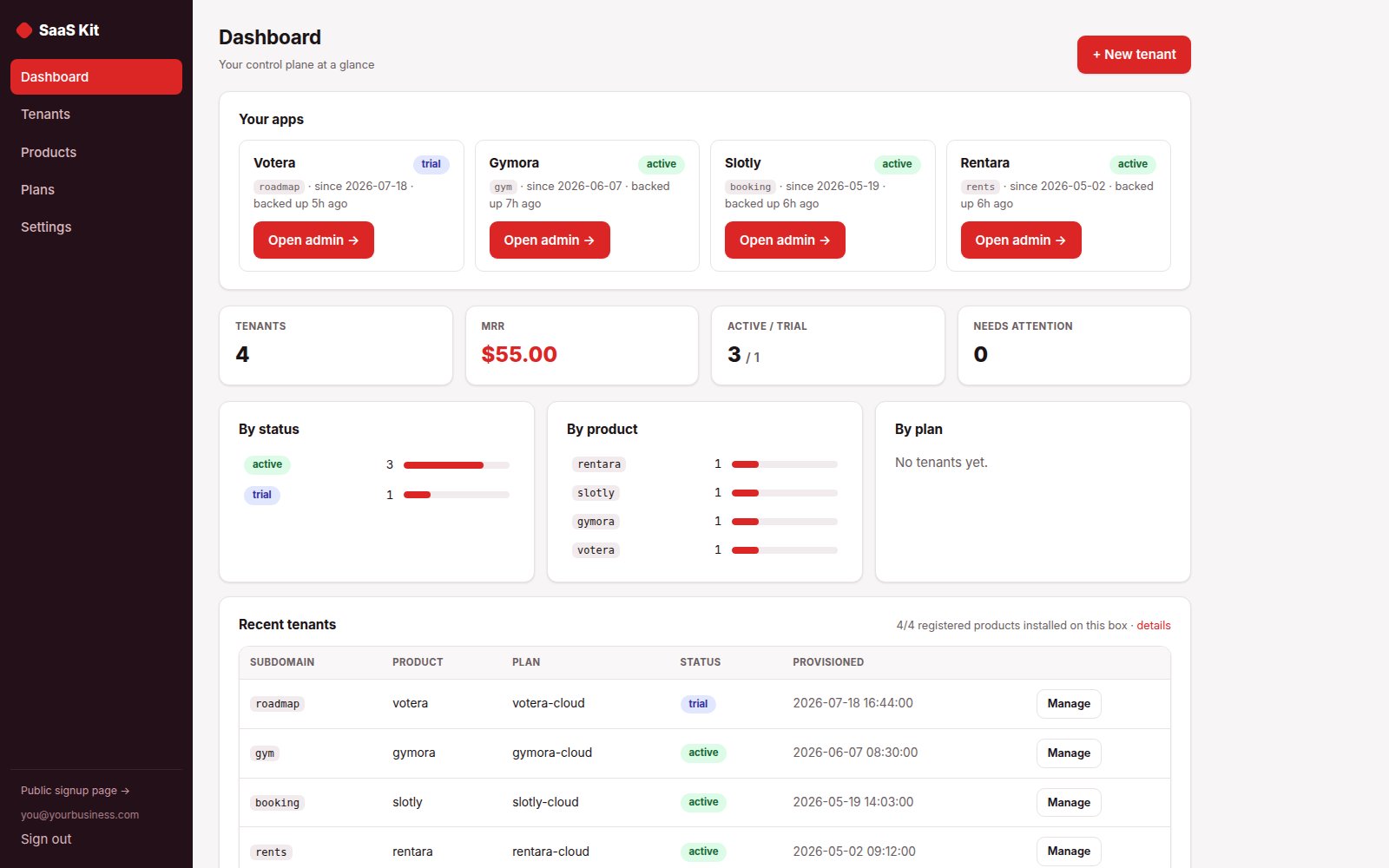
The console, running
One login: every app as a tile, live status, backup age, and a single-use "Open admin" hand-off into each. The same console ships in the box and runs our hosted tier in production.
Before you buy
Plain PHP 8.1+ (tested on PHP 8.3) with MySQL, MariaDB or SQLite, on ordinary shared hosting or the smallest VPS. Each app has its own two-minute web installer and its own database.
Every app above has a live demo on sample data, with no sign-up. The demos run the same builds you download.
The full PHP source of every app. Your data stays on your server, with CSV export and one-click backups in each app, and nothing connects back to us.
What each app deliberately doesn't do
Each app's own limits apply unchanged when it arrives as part of the suite.
Own Your AI (OYA)
- Not a model: you bring the model server (llama.cpp, Ollama, LM Studio, vLLM); the setup recommends and downloads one, verified
- Linux and macOS are the execution hosts; Windows users run it under WSL (the isolation verdict is self-verifying there)
- No desktop app, editor plugin, image generation, speech, browser automation or messenger bridges in the core — those are pieces, or not at all
- The public showcase at oya.ownware.io replays recorded runs; there is no model on that box — OYA runs on yours
- Mail is IMAP/SMTP over TLS with app passwords; OAuth-only mailboxes are not supported
SaaS Kit
- Not for $3 shared hosting — per-tenant databases need CREATE DATABASE privileges, so a VPS or a host where you control MySQL is required
- You need wildcard DNS (*.yourapp.com) pointed at your server — no wildcard record, no tenant subdomains
- Billing runs on your own Stripe or Lemon Squeezy keys; the kit is not a payment processor and takes no cut
- Isolation is at the PHP/database level, not container level — not Docker/VM-per-tenant infrastructure isolation
- Not the end business — if you're one company wanting one instance, buy the underlying product itself, not this kit
Invora
- Invora never processes cards. Bring your own payment link (Stripe Payment Link, PayPal.me, your bank's page); payments are recorded here when they land.
- Not double-entry accounting, a general ledger or an ERP — it exports clean CSV/JSON for whatever keeps your books.
- Single-tenant: one business per installation.
- Email goes through your own SMTP server; there is no relay and no sending service.
- Invoices go out only when a person presses Send. Automatic payment reminders (3.2) are off until you switch them on; you approve the schedule and the wording once, and they go through your own SMTP.
Slotly
- Slotly never touches a card. With card payments switched on, a deposit or the full price is paid at booking on Stripe's own page through your own Stripe account; without them, deposits are quoted and tracked and your own payment link (a Stripe or PayPal page) is shown beside the amount due.
- Calendar sync is by .ics, both ways: Slotly's token-guarded feeds go to your calendar, and your own calendar's private .ics address blocks your booking page. No account connection, and your calendar is never written to.
- On the autumn DST change the repeated wall-clock hour is offered once, not twice — only relevant if you take bookings between 2 and 3 a.m.
- Not built for a multi-vendor marketplace.
- Single business per install.
Vendra
- One shop per installation (single stock ledger, single drawer).
- Vendra records card tender; it does not process cards.
- No e-commerce or website stock sync.
- Emailed receipts and the day-close email need your own SMTP details, and both ship switched off; without SMTP the receipt is still printable and viewable on screen.
- Barcode hardware: keyboard-wedge USB scanners work as typed input; no driver-level integration.
- The till needs its server: if the connection drops, a sale cannot complete until it returns; the cart stays on screen until the page is reloaded.
- No fiscal module. Vendra records sales, stock and tenders; it is not a fiscal cash register and does not report to any tax authority. It has no certified security device, no fiscal signature and no connection to any tax authority. Many countries have rules for tills that take payments, including Germany, Austria, France, Italy, Spain, Portugal, Poland, Sweden, Norway, Croatia and Greece. Where rules like these apply to your business, Vendra on its own does not meet them. Check what applies to you with your tax adviser or tax authority before you use Vendra as your till.
Gymora
- Your front desk runs it, and members get their own page to book classes and see what is due; the join page offers only the plans you choose.
- Single location, single-tenant: one installation per gym.
- No card ever passes through it. With card payments switched on, members pay on Stripe's own page through your own Stripe account and the charge marks itself paid; otherwise it shows your own payment link and you mark charges paid.
- Email goes through your own SMTP server and texts through your own SMS gateway, and every message — to you or to a member — is off until you switch it on.
- Expiry notices, the billing run and member messages need a scheduler:
cron/expiring.phpandcron/billing.phpdaily,cron/messages.phphourly — the app runs no background jobs by itself.
Rentara
- One portfolio per installation, shared by your team with viewer, member and admin roles.
- Not for finding or marketing to new tenants; not a general ledger.
- Holds no money and no card details: record payments as they arrive, or switch on card payment through your own Stripe account and the tenant pays on Stripe's page.
- The tenant portal is a per-lease magic link: no accounts, no passwords; a Pay by card button appears only if you switch on your own Stripe account.
- Email goes through your own SMTP server. Messages to a tenant are off until you switch them on.
- Arrears are computed when you look; rent reminders and the daily list go when someone opens the dashboard or a daily cron call runs them.
- Very large portfolios (hundreds of units) want a custom setup.
Consigna
- No card processing and no cash drawer: the counter records how the customer paid on your own terminal. Consigna is not a fiscal till and does not report to any tax authority.
- No payment processing — payouts are recorded, not transmitted.
- One shop per installation; your team shares it with roles.
- The consignor portal is read-only by construction — it resolves a hashed token and renders; there is no write route behind it.
Approva
- Not an accounting system or ERP; it does not post to a general ledger.
- It does not process payments — Approva approves requests and issues POs; it never moves money or pays vendors.
- No 3-way matching (PO ↔ goods receipt ↔ invoice), no inventory and no encumbrance accounting: budgets flag a request, they never hold money or block one.
- No punchout catalogs or supplier portals — a request describes the purchase in your own words.
- One currency per installation (pick any at install — EUR, GBP, AUD, CAD, CHF and more are formatted natively).
- Single-tenant: one organization per installation.
Cashora
- Cashora records cash movements; it never processes, moves or holds money.
- One business per installation (many cash boxes inside it).
- Receipts are attached files and text references; reading a receipt uses your own AI key or Ollama server, and is off until you switch it on.
- Counts record what was found; Cashora never invents an entry to make a difference disappear.
Commissa
- Commissa computes commission; it pays nobody and moves no money.
- No live CRM connection — CRM deal exports import as files, matched to reps by name.
- One currency and one company per installation.
- Reps have no logins; each gets a private statement link instead.
- Nothing is emailed on a schedule — a statement email is a button a person presses.
Privara
- No automated data-discovery across systems — it tracks requests, it does not scan your databases for personal data
- Not a full GRC suite: no policies, DPIAs, breach management, or staff training records
- Not built for multi-tenant SaaS platforms needing isolated per-customer workspaces
- Using Privara doesn't itself make you GDPR-compliant — legal sufficiency of your responses is your responsibility
Confida
- Single organization per install (not multi-tenant).
- No supervisory-authority e-filing and no e-discovery platform.
- Handler email notifications deliberately carry no report content, and attachments never leave the server by email, webhook or calendar feed.
- Attachments are photos only (JPEG/PNG, metadata stripped, encrypted at rest); documents are refused because their author metadata cannot be reliably removed.
- Anonymity is an application guarantee, not a network or hosting guarantee — HTTPS and sane server logging are on you.
- Written intake only. Article 9(2) of the Directive lets a channel be "in writing or orally, or both"; Confida is the written kind — there is no telephone or voice-message intake here, no dedicated screen for typing up a call, and no field recording that a report arrived orally. The physical meeting a reporter may request is a process you run, not software you install.
- Aligns with the EU Whistleblowing Directive's timers and workflow; it is not legal advice.
Complia
- Single-tenant: one organization per installation (your team shares it, with viewer / member / admin roles and invite links).
- Email goes through your own SMTP server, never ours. Acknowledgment reminders are optional and off until you switch them on; they are checked whenever someone opens the dashboard, and by a daily cron call on days nobody does.
- Not a case-management suite: each complaint can have one named owner and acknowledgment reminders, but there is no workload allocation, no escalation between people and no billing. Attachments and an append-only investigation log are in.
- English-language UI.
- A records aid, not legal advice; buying it does not make you compliant.
Packora
- US-state scope; no EU/Canada program logic and no PRO API integration.
- Fee figures are estimates from the rates and eco-modulation adjustments you entered — no minimums or mid-year schedule changes.
- You maintain the reference data (materials, deadlines, rates); verify with your PRO each cycle.
- One company per installation; your team shares it with roles.
- Annual granularity, matching the annual-report cadence.
- Reminders reach people, not portals: Packora never files, submits or logs in for you.
Safora
- Single-tenant: one business per installation (staff share the one instance, with roles).
- Safora documents your records; it does not connect out to fridge probes or IoT sensors. A probe that can make an HTTP request can post readings to the REST API: an out-of-range one is stored as an open breach, red until a person records the corrective action.
- It does not submit anything to any authority; it produces records you keep and present.
- Not legal advice, and not a certificate of compliance. The thresholds are HACCP-aligned defaults you can change; the bank-holiday list is England & Wales — one-off royal holidays, Scotland and Northern Ireland differ.
- Email goes through your own SMTP server; the open-breach chase is off until you switch it on.
Waiverly
- No government-ID identity verification, notarization, or eIDAS advanced/qualified signatures — Waiverly proves what text was signed and that it has not changed, not who the signer legally is.
- No online payment collection: signatures, not money.
- Email goes through your own SMTP server — Waiverly ships no mail service and opens no account for you.
- A record-keeping tool, not legal advice — whether your wording protects you is a question for your lawyer.
Secreta
- Files up to 5 MB by default (25 at most), encrypted like the text; not previewed and not in the database backup.
- HTTPS is required in production — the encryption happens in the browser, and browsers only expose Web Crypto on a secure origin.
- Opening a link spends a view even if a passphrase attempt is wrong: the server cannot tell whether decryption succeeded — recipients are warned before revealing.
- A lost passphrase cannot be recovered. There is no reset, because the key never reached this server.
- Secreta sends no email at all: invitations and share links are handed over, never posted.
- Free tools such as PrivateBin cover one-off sharing; Secreta adds team accounts, sharing ceilings, an audit trail, SSO and an API on a server you already run.
- Collecting credentials from clients? Request links do it without email and without an account on their side.
Certora
- Not a PKI/digital-signature system — verification is a database lookup on your server: the code resolves to the record you issued, or it does not. Provenance, not cryptography.
- Email goes through your own SMTP; certificates are delivered as a private link, never as an attachment, and delivery is off until you switch it on.
- A seal or logo on the certificate must be a JPEG or a plain 8-bit PNG (no transparency, interlacing or palette) — the PDF is written without an imaging library on purpose.
- Single-tenant: one issuing organization per installation.
Extracta
- No API connection to accounting software — named CSV presets (QuickBooks, Xero) you upload yourself: nothing to authorize, no vendor that can cut you off.
- Single-tenant: one business per installation, with teammates added as viewer, member or admin on the Team page.
- No OCR built in — the vision model you configure does the reading (e-invoices are read from their XML, with no model); every extracted figure is shown for a human to approve before it counts.
- Scanned PDFs (images embedded in a PDF) may extract less accurately than native text-layer PDFs.
- Extraction accuracy is not guaranteed for any specific format, language, or jurisdiction — which is why the review screen exists.
Expensa
- No API connection to accounting software — named CSV presets (QuickBooks, Xero) you upload yourself.
- Not accounting software: it turns receipts into a reviewed, exportable expense report — no ledger, no filing.
- No OCR of our own: bring your own vision model; every figure is human-approved before it counts.
- Single-tenant: one business per installation, with teammates as viewer, claimant, member or admin — run one per client if you are a bookkeeper.
- Email (yours and the claimant's) goes through your own SMTP; claimant email ships off until you enable it.
Specta
- No direct storefront API integration — export CSV/JSON and import it yourself. The import-header check tells you whether that file will land cleanly in your store before you try.
- Confidence scores are heuristic, computed offline from parse quality — a review-priority signal, not a probability of correctness.
- Batches process one file per request (deliberate, for shared hosting): a 20-file batch is 20 model calls at your own provider cost, and the auto-advance page must stay open.
- BYO key: an OpenAI or Anthropic key, or a local Ollama with a vision model. Multi-page PDFs are best with Anthropic; other providers are best-effort.
- Single-tenant: one business per installation, with teammates as viewer, member or admin. No OCR built in; the model you choose does the reading.
Cargora
- No ERP or accounting API integration — Cargora writes importable files (documented columns) and you import them. No vendor API is spoken, no credentials held.
- PDF extraction works best with text-layer PDFs; scanned pages depend on the model you configure.
- Single-tenant: one business per installation; teammates join by invitation as viewer, member or admin.
- Reconciliation matches by SKU (case- and spacing-insensitive, punctuation significant); lines without a SKU are reported rather than matched.
- No OCR built in; the model you choose does the reading.
Ledgira
- No bank feed / Open Banking: Ledgira reads statement files you already have.
- No direct accounting-software integration: you download CSV (with QuickBooks and Xero presets), QBO, OFX, QIF or JSON and import it yourself.
- Not the book of record; it reconciles and hands off.
- No OCR of our own: bring your own model; every figure is human-approved.
- With OpenAI or Anthropic, each statement is sent to that provider under your own key; with a local Ollama model, statements never leave your server.
- Single-tenant: one business per installation.
Menura
- No POS API integration — Menura writes files (POS CSV / nested CSV / JSON, columns documented in the README and pinned by tests) and you import them. No till vendor's API is spoken, no credentials held.
- PDF extraction works best with text-layer PDFs; a scanned or photographed menu is the model's job, and models vary.
- One restaurant per installation (single-tenant); your staff share it with viewer, member and admin roles.
- The QR menu shows the menu; it does not take orders or payments.
- No OCR built in; the vision model you configure does the reading.
- Extraction accuracy is not guaranteed for any given menu layout or language — which is why the review screen and the POS import preview exist.
Fixora
- One site per installation; your team shares it with roles.
- No native mobile app — responsive web, installable as a PWA. No app-store build to keep alive.
- Meter readings are entered manually — no IoT or telematics ingest.
- No purchasing or purchase-order module — stock is adjusted by hand or consumed by a work order.
- QR tags need a phone camera and network access to your install. While the request form is on, anybody holding its link or a printed tag can send a report; a new link closes every old one.
- The PM calendar feed is read-only: changes are made in Fixora, not in your calendar client.
Lendra
- Single-tenant: one organization per installation.
- Not a full IT asset-lifecycle suite — no depreciation, purchase orders or helpdesk/ticketing.
- Not an accounting or rental-billing tool — no pricing, invoices or payments.
- Email goes through your own SMTP server. Messages to a borrower are off until you switch them on, and the same person is never written to twice in a day.
- Lendra runs no background job of its own: reminder emails to borrowers (due back soon, and overdue) go out through your own SMTP server when
cron/overdue.phpruns, and overdue ones can also be sent from the Overdue page.
Restock
- Forecasts are transparent estimates from your own sales history (moving average, recent-weighted, or the same period last year) — the math is shown, not a black box, and they stay estimates.
- One company per installation; your team shares it with roles.
- No supplier API or shop-platform connectors — sales and stock arrive by CSV, by the REST API, from a till such as Vendra, or from your own AI agent over MCP; purchase orders leave as a file (supplier / QuickBooks / generic CSV presets, or a PDF).
- Restock plans the buying; it does not pay for it (no invoices, payments or ledger).
Revup
- Single-tenant: one business per installation (staff get their own accounts, roles and 2FA).
- Email is plain-text by design — a plain message from your own SMTP lands where a templated HTML one often does not.
- Scheduling is a send window plus one follow-up, not a branching drip campaign — a second ask reads as pestering, which costs more reviews than it wins.
- The unattended schedule needs a cron entry you install yourself (one line, printed in the app, which also shows when the runner last ran).
- Twilio is the only built-in SMS provider; manual mode works with any channel you already use.
- No direct Google/Yelp API integration — the rating page links to your public review URL, and every customer who rates is shown it.
- Revup does not read or answer reviews posted on Google or other platforms, and posts nothing to social media itself.
- A Vendra sale cannot start an ask on its own yet: Vendra's sale webhook carries no customer contact.
Permora
- One company per installation; your team shares it with roles.
- Permora records what staff enter — no AHJ portal, e-permitting, filing or payment integration; the one outside system it reads is your own Jobora, if you connect it. That is exactly why there is no filing, payment or e-signature surface on your server to secure.
- Fee totals are single-currency by design; cross-currency sums are never shown.
- Attachments are PNG, JPEG or PDF up to 10 MB, checked by content, served only to a signed-in user through a controller.
- Calendar feeds are read-only and per-feed revocable; changes are made in Permora.
- Not legal advice: whether a permit is still valid is a question for the authority that issued it.
- Permit alerts are email only (no text messages), once a day, and go when someone opens Permora or a daily cron calls them.
Supplia
- Single-tenant: one company per installation.
- Not a contract-lifecycle suite: no redlining, versioning, approval routing, clause library or e-signature. It files the signed thing and watches the dates around it.
- No accounting or payment integration; values and payment terms are recorded text and numbers.
- Cross-currency contract values are never summed — the value currency is one business-wide display setting.
- Uploaded documents live on your own server: type decided by the file's bytes, generated filename, 10 MB cap, served only through a permission-checked route.
- The calendar feed's URL is its credential: stored hashed, revocable, carrying no contact details and no contract values.
Leavora
- Single-tenant: one business per installation.
- Records leave only — no payroll, no wage calculation, no HRIS integration.
- Approving is always an administrator's act; self-service employees request but never decide — including their own request.
- Carryover is a single cap per leave type; tenure tiers, negative balances and part-time proration by hours are out of scope by design.
- Accrual — annual or monthly — counts a month only when the employee was employed at its start (no partial-month pro-rating), so balances imported from a pro-rating system can read slightly higher.
- Email sends through your own SMTP server; every employee email is off until you turn it on.
Assetora
- Assetora is a register, not accounting advice: it does the arithmetic, you confirm the policy.
- Not a general ledger — it exports the journal a ledger imports.
- No API connection to accounting software: a file you upload, by design.
- Moves no money; connects to no bank or gateway.
- Single-tenant: one business per installation.
Rostera
- Not a time clock: it plans and publishes shifts; it does not capture attendance.
- No pay rates, ever — hours and coverage, not wages.
- Swap requests exist; approving a swap is always a human act — there is no automated swap engine.
- Email goes through your own SMTP server; telling staff about a published rota is off until you switch it on.
- Single-tenant: one business per installation.
Clockora
- Single-tenant: one business per installation.
- Hours only — no invoicing, pricing, rates, wages or payroll. No email can contain a pay figure because the product stores none.
- Overlap detection applies to clock entries (start + end); manual-duration entries have no position on the clock, so a per-employee-per-day 24-hour ceiling refuses the impossible day instead.
- Email sends through your own SMTP server; every staff-facing message is off until you turn it on.
- Reminders need a scheduler:
cron/reminders.phpmust run daily — the app does not run background jobs by itself.
Votera
- Voter identity is an anonymous per-browser cookie key by default (one vote per browser); the email gate and verified voting are the opt-in escalations.
- Voters can opt in per idea to one ship notification; there is still no marketing list and no bulk mail.
- Voters can sign in from your own app (a signed token); staff sign in through OIDC.
- Team members are managed in the app: roles and single-use invite links.
- HTTPS recommended in production (standard for any login-bearing app).
Tokora
- The display board is a web page you open on a screen you already own — no signage hardware, ticket printer or audio caller is included, and none is driven.
- The spoken call-out uses the display screen's own browser voice; sound starts after one tap on the board.
- Optional text alerts need your own Twilio account — Tokora ships no messaging account, and there is no email, push or WhatsApp.
- A live walk-in queue, not an appointment book: nothing here reserves a future slot.
- Single-tenant: one organization per installation (staff get their own accounts, roles and 2FA).
Deliora
- Payments run through a merchant-of-record or Stripe redirect — there is no on-box card processing, by design.
- Discount codes are created at your payment provider; Deliora fills them in at checkout (Lemon Squeezy, and Stripe payment links with promotion codes turned on), one link per code. Prepaid redeem codes ship built-in. Deliora itself never reprices: the price a buyer sees is always the price charged.
- Payments start in demo mode. Paste your Lemon Squeezy or Stripe webhook secret and a license secret into config.php, and every webhook is checked by HMAC signature; an unsigned or wrongly signed webhook is refused and nothing is written.
- No marketplace or multi-vendor features.
- No recurring-subscription billing engine — one-time purchases with license tiers.
- Two staff roles — admin, and a support seat that sees orders, customers and licenses but cannot change the shop; buyers use passwordless magic links.
Jobora
- One business per installation. Your team shares it with viewer / member / admin roles. Two trading companies means two installations.
- Jobora never processes a card. Card payment happens on your own Stripe account's page and Jobora records what Stripe reports. A refund made in Stripe is not mirrored back.
- No stock control. A material line is a cost against a job, not a draw from an inventory.
- Repeat work places visits eight weeks ahead and invoices each visit on its own; there is no monthly bundled invoice.
- No customer accounts: customers use their own document link, and, if you switch it on, the booking page.
- Email is off until you switch it on, and it goes through your own SMTP server. No relay.
- A signature is captured, not verified. Not identity verification, not eIDAS-qualified. On a server without GD the blank-pad check falls back to a size floor, so a very small signature could be refused.
- The margin is only as honest as what you log.
- No offline mode.
- English only.
- Automatic follow-ups run when someone opens the dashboard, or from a daily cron call; on a host with no cron where nobody opens Jobora that day, nothing goes that day.
Warrantora
- One business per installation.
- The customer side is deliberately small and off by default: a customer checks cover, raises a claim and follows it; they cannot edit a claim or see your internal assessment. An item registered without an email address cannot be looked up.
- Editing a warranty term re-dates every item registered under it.
- An item with no sale date has no expiry and is reported as
unknown. The product will not guess. - A claim's in-warranty flag is frozen when it is raised. Correcting the sale date later does not move it — which means a data-entry error found late needs the claim raising again.
- No approval workflow beyond one decision. No multi-signature chain, no escalation, no SLA timer.
- No money. Not the purchase price, not the repair cost, not a refund amount. Supplier claim-back records which claims went to which supplier and their answer, never an amount.
- Evidence is stored unencrypted on your disk, behind the login. The JSON backup covers the database; the evidence archive carries the files, and is a download you make.
- English only.
- Registration at the point of sale is an API, not a plug-in: Warrantora ships no Shopify or WooCommerce app.
Loyalora
- No marketing of any kind, by design and by test — no campaigns, no mailing lists, no segments, no send-to-all
- No point-of-sale and no e-commerce or storefront widget — points can come straight from your till through the API, once per sale
- Holds no card numbers and processes no payments
- One earning rate per program, with VIP tiers and item bonuses on top, and a reward catalog
- One business per installation, with as many shops as you run
Fleetora
- No telematics, no GPS, no device or dongle integration of any kind: readings arrive as your tracker's CSV export or through the API
- No work orders and no parts inventory — it is a register, not a workshop system
- No inspection-form builder and no scheduled checklist workflow — it records the walk-round a driver completes, in the app or from the cab QR, and every fault it finds
- Installable to a phone, but page views are network-only: it does not work out of signal
- Connects to no licensing authority, insurer or manufacturer — nothing is fetched or verified for you
- Not legal or compliance advice; the document types and intervals are yours to set
- One business per installation
Cyresora
- Not legal advice, and not a scope determination — it records your determination and your reasoning, it does not make it
- NIS2 is a Directive — it models the Directive's own stages, not 27 national transpositions
- It does not file anything. No integration with the CRA single reporting platform or any national portal
- Not a vulnerability scanner and not a CVE feed — a register of what you are handling, not a discovery tool
- No SOC, no SIEM, no detection — the clock starts when you record that you became aware
- Single-tenant: one organization per installation
Visitora
- A sign-in book, not a security system. It records what people tell it — no ID scan, no passport read
- No door access, no turnstiles, no badge encoding — it does not unlock anything
- No photo capture, no ID upload — deliberate: neither is needed to answer "who is inside", and both are data you then have to protect
- Single-tenant: one site per installation
- Email through your own SMTP server and texts through your own SMS gateway, both off until you switch them on — no push, and Visitora sells no credits for either. A host gets arrival texts only if they ask for them, and arrivals can also be posted to your team's Slack, Teams, Google Chat or Discord channel
- The visitor is never emailed a copy of their visit — only the host arrival notice and the pre-registration link
- Not legal advice — the right retention period, and whether your site rules are adequate, are your decisions
Trainora
- It does not issue certificates itself — it holds the evidence you were given, and sends a certificate to your own Certora only when you press the button on a record
- Not a learning platform — no courses, no content, no quizzes, no e-learning, no SCORM
- Not a rules engine — a competency applies to everyone, a team or role, a location, or that role at that location
- No login for the people in the register — each person can have a private link to their own record, and send you a new certificate to confirm
- Changing a competency's validity does not rewrite records already on file
- Single-tenant: one organization per installation
Inspectora
- Not a CMMS — no work orders, no parts inventory, no maintenance planning
- It does not perform or certify inspections — it records that one happened; its certificate of inspection for a passed record states what was recorded here, and is not a regulator's
- One tag, not a rules engine — an inspection type applies to all assets, or to one group
- No contractor portal — someone records an inspection by signing in with a member's account; the read-only report link shows one inspection and changes nothing
- Changing an interval does not rewrite records already on file
- Single-tenant: one organization per installation
- It is not an offline app — the inspection form keeps your answers on the phone, so a dropped connection loses nothing but the chosen photos, but nothing is recorded until the form reaches your server
Onboardora
- Not an HR system of record — no payroll, no salaries, no contracts of employment, no holiday tracking
- No right-to-work or background-check verification — you can tick that the check happened, it does not perform it. A starter can upload a copy of a document you ask for; Onboardora does not check it, and makes no claim that uploading it satisfies any legal obligation
- No payroll/HRIS connector — REST API, signed webhooks and MCP are there; wiring them is yours. A webhook can post a one-line message to a Slack-style chat
- No offboarding — equipment tracks issue and return, but there is no leaver flow
- No employee login — the starter's page is a private link, not an account; it reaches their own plan only
- Single-tenant: one company per installation
- Not legal advice — what belongs on a checklist where you operate, and how long you keep the record, are your decisions
Membora
- No card processing of its own — members can pay dues by card on Stripe's own page when you switch on card payment with your own Stripe account; otherwise it records what was paid
- No member logins — members register for events with their number and email and carry a card link; they are tracked, not users
- No online or remote voting — it records votes taken at a meeting, it does not run ballots
- No accounting — subscriptions are a membership fact, not a ledger
- Single-tenant: one organization per installation
- Not legal advice — what your constitution requires for quorum and eligibility is yours to set
Helpora
- Internal requests, not a customer helpdesk — no customer accounts, no branded ticket site
- No inbound mail — no IMAP polling, no mail parsing. Requests come in through the request form; the API and the AI assistant read, reply and settle, and file nothing.
- No requester passwords — colleagues follow their requests by signing in with your own identity provider, or with a reference and passphrase.
- No CMDB, no change approvals, no incident/problem hierarchy — a request queue, not an ITSM suite
- No live chat, no phone integration
- Single-tenant: one organization per installation
Suite questions
What exactly do I receive?
Are these the same apps sold one by one?
Do the apps share one install or database?
I already own one of these apps. Do I pay for it again?
Can I start with one app and add the rest later?
What happens on a refund?
Which license do I need?
It comes down to how many installations you need. Running your own business on one site is the Single license. Running it on more than one site you own or operate is the Extended license, with no cap. Both cover every app in the suite.
- Install it on one domain or subdomain you own or operate
- Change the source however you like for that installation
- Run your own business on it commercially, client work included
- Re-download the current build any time from your buyer portal
- A second site, or an installation you hand to a client as theirs, needs the Extended license
- No reselling, redistributing or sublicensing the source
- Not for offering it to other people as a hosted service
- Everything the Single license grants
- Install it on as many domains as you own or operate — no cap on the number
- Up to ten client installations, one per client project, handed over or hosted for each client; for more, buy another Extended license
- White-label: remove or replace the product name and logo in the screens of client installations
- Still no reselling or redistributing the source itself
- Running it as a multi-tenant service others sign up for needs a SaaS agreement
Every download carries the full terms as LICENSE.txt. The complete wording is on the terms page.